
Business communication services often grow one decision at a time.
A mobile line is added for a new employee. A tablet is activated for the sales team. A hotspot is ordered for a temporary worksite. A second internet connection is opened when the company expands. Device payments, insurance, international features, and other charges are added along the way.
After several months or years, the business may be paying multiple bills without a clear view of which services belong to which employees, devices, or locations.
That is when a combined mobile-line and internet review becomes useful.
The purpose is not to assume that bundling will automatically reduce costs. It is to create an accurate picture of what the business currently has, what it still needs, and what should be questioned before making changes.
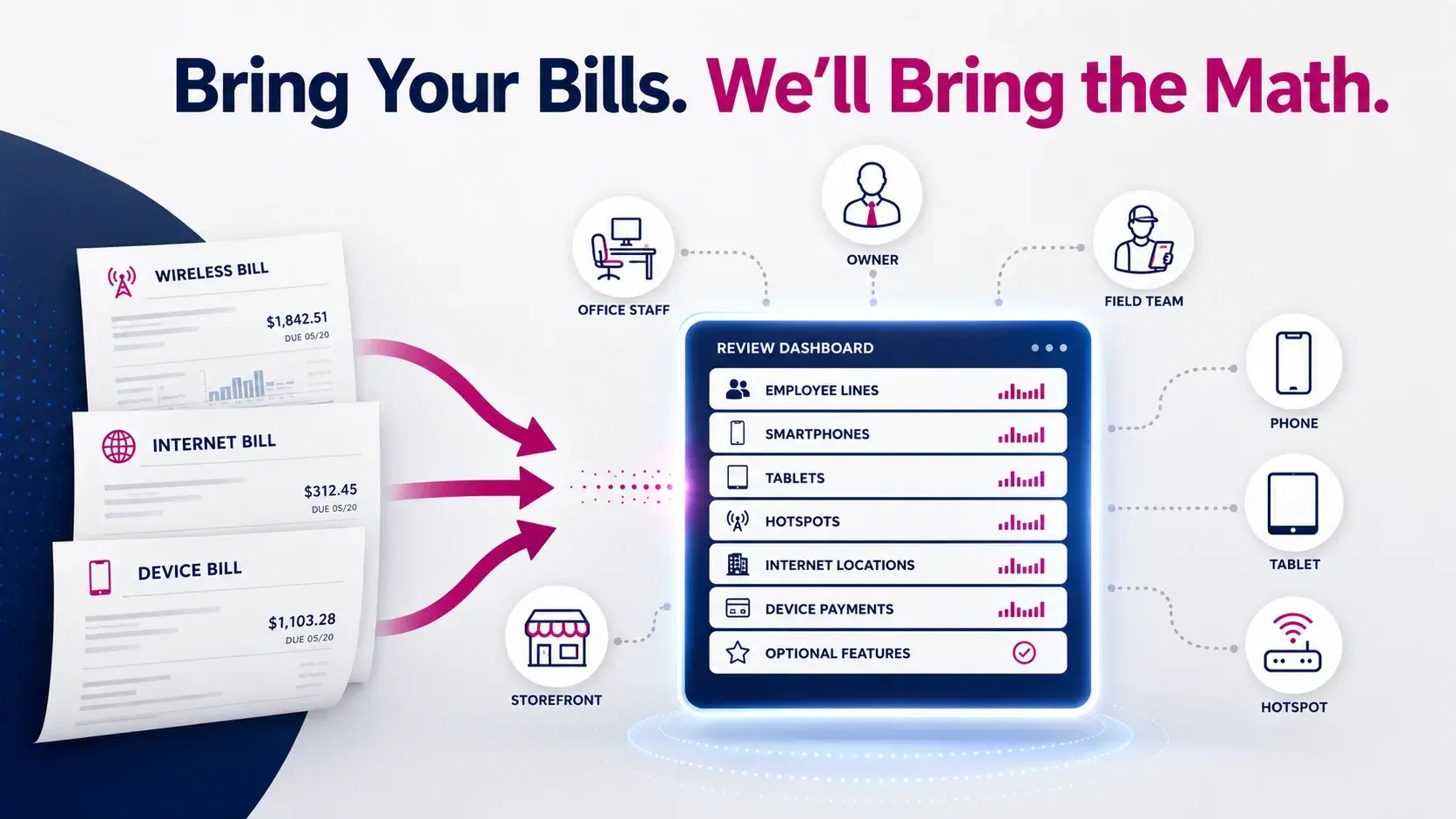
Bring Your Bills. We’ll Bring the Math.
Why Business Services Become Difficult to Track
Most small and medium-sized businesses do not purchase every mobile line, device, and internet connection on the same day.
Services are usually added as the company changes.
Common situations include:
- Hiring a new employee
- Opening another location
- Adding a field team
- Replacing a damaged phone
- Ordering tablets for a specific project
- Activating hotspots for temporary use
- Taking over an account from a former manager
- Adding backup connectivity after an outage
- Moving services between billing accounts
Each individual decision may make sense at the time. The problem appears when no one reviews the full account later.
A company may have active lines with unclear ownership, devices that are no longer used, charges split across departments, or services that no longer match the way employees work.
Review Services Together, but Evaluate Them Separately
A combined review does not mean every service should be forced into one package.
It means placing the information in one organized view.
The business should review:
- Mobile phone lines
- Smartphones and device payments
- Tablets
- Hotspots
- Connected-device lines
- Primary internet connections
- Backup internet connections
- Separate business locations
- Optional account features
- Taxes and recurring fees
Once everything is visible, each item can be evaluated on its own purpose.
For example, the business may discover that its office internet is appropriate but several mobile lines need attention. Another business may have a well-organized mobile account but no backup plan for its main location.
The review should find the real gaps instead of assuming every service needs to change.
Start With the Bills, Not the Advertised Offer
An advertised price does not show the complete effect of a business service change.
A current bill may contain:
- Monthly service charges
- Device installment payments
- Insurance or protection plans
- International features
- Hotspot or tablet lines
- Account-level discounts
- Taxes and government fees
- One-time adjustments
- Credits with expiration dates
- Charges carried over from an earlier period
Before comparing options, separate recurring service costs from device costs and temporary adjustments.
This creates a more accurate baseline.
When reviewing the current bills, ask:
- What is the normal recurring monthly amount?
- Which charges will eventually end?
- Which discounts are temporary?
- Are there lines with little or no usage?
- Are device payments included in the total?
- Are optional features still required?
- Are all listed employees still with the company?
- Does each device have a known user or business purpose?
This is the practical meaning of:
Bring Your Bills. We’ll Bring the Math.
The goal is to organize and compare the information—not to guarantee that every business will save money.
Build a Complete Service Inventory
A service inventory is a simple list of every account, line, device, and connection used by the business.
The inventory can be created in a spreadsheet or basic document.
For each mobile line, record:
- Employee or department
- Phone number
- Device type
- Device owner
- Main work location
- Typical use
- Hotspot requirement
- International requirement
- Device payment status
- Account name
- Billing responsibility
For each internet connection, record:
- Business location
- Current purpose
- Primary or backup role
- Account owner
- Monthly service charge
- Critical systems supported
The inventory often reveals information that is difficult to see from the total at the bottom of a bill.
Match Mobile Lines to Employee Roles
Not every employee uses a mobile line in the same way.
A useful review should connect each line to the employee’s actual responsibilities.
Owners and Senior Managers
Owners and managers may need dependable calling, messaging, email, data, hotspot access, and communication across several business locations.
They may also require access while travelling or outside normal office hours.
Office Employees
Office-based employees may spend most of the day connected to business Wi-Fi.
Some may need a full mobile line for customer calls, while others may only need occasional communication away from the office.
Sales and Field Teams
Sales representatives, technicians, contractors, delivery teams, and other mobile employees may rely heavily on:
- Navigation
- Scheduling
- Customer calls
- Cloud applications
- Photos and document uploads
- Mobile forms
- Team messaging
- Hotspot access
Their mobile requirements should be based on their work outside the office rather than the needs of desk-based employees.
Shared and Temporary Roles
Some devices are shared by shifts, departments, temporary workers, or job-site teams.
The business should document who is responsible for each shared device and how it is returned, reassigned, or deactivated.
Look for Orphaned and Unclear Lines
An orphaned line is an active business line that no longer has a clear user or purpose.
This can happen when:
- An employee leaves
- A temporary project ends
- A damaged device is replaced
- A phone number is transferred incorrectly
- A tablet is placed in storage
- A hotspot is returned without cancelling the service
- Account administration changes hands
Do not assume that a line with low usage is automatically unnecessary. It may belong to an emergency device, manager, alarm system, or connected tool.
Instead, label every line as one of the following:
- Actively assigned
- Shared business device
- Seasonal or temporary
- Emergency use
- Pending reassignment
- No longer required
- Needs investigation
This prevents important lines from being removed accidentally while making unclear charges easier to investigate.
Separate Mobile Service From Device Costs
One of the most common sources of confusion is combining the mobile service charge with the cost of the device.
A phone bill may include both:
- The monthly line or plan
- A monthly device installment
A proposed service may appear lower until new device payments, protection plans, or activation costs are included.
For every smartphone or tablet, identify:
- Whether the device is fully paid
- The remaining balance
- Whether an upgrade is planned
- Who owns the device
- Whether the device will be kept
- Whether it can be used with another service
- Whether protection coverage is still needed
This helps the business compare the complete cost rather than focusing only on the line price.
Review Tablets, Hotspots, and Connected Devices
Smartphones are usually the most visible part of a mobile account, but other connected devices can create a significant portion of its complexity.
Tablets
Tablets may be used for:
- Mobile point-of-sale
- Customer check-in
- Inventory
- Presentations
- Digital forms
- Field reporting
- Scheduling
- Employee training
Confirm who uses each tablet and whether it still needs its own cellular connection.
A tablet used only inside the office may rely mainly on Wi-Fi, while a tablet used by field employees may need independent connectivity.
Mobile Hotspots
Hotspots may support travellers, temporary sites, remote teams, or employees working where Wi-Fi is unavailable.
Review how often each hotspot is used and where it is stored when not assigned.
Connected Devices
Some cellular lines may belong to tracking equipment, monitoring systems, laptops, payment devices, or other tools that do not appear to be normal phone lines.
These should be identified before account changes are made.
Find Gaps as Well as Unnecessary Services
A good review should not focus only on what can be removed.
It should also identify missing services that are creating workarounds.
Possible gaps include:
- Employees using personal phone numbers for customer calls
- Field workers relying on personal data
- Managers paying for business expenses personally
- Teams sharing one hotspot across several locations
- Tablets that cannot connect outside the office
- New employees waiting for properly assigned devices
- Critical locations operating with only one internet connection
- Mobile lines managed under former employee credentials
These situations can create inconsistent communication, unclear expense reporting, and account-management problems.
The correct outcome may involve removing some services, adding others, or simply assigning clearer ownership.
Review Primary and Backup Internet as One Part of the Account
Internet should be included in the bundle conversation, but it does not need to dominate it.
For each business location, identify:
- The current primary internet provider
- Whether a backup connection exists
- Which operations depend on that location
- Which department pays the bill
- Whether the account information is current
- Whether the connection supports office or customer-facing systems
A multi-location business may have different requirements at each address.
One office may need primary internet only. A retail or appointment-based location may also need backup connectivity because payments, calls, or bookings cannot easily pause.
Availability should be reviewed for each location before changes are finalized.
Questions to Ask Before Moving Mobile Lines
Switching or reorganizing business mobile services requires more than selecting a plan.
Important questions include:
- Which numbers must be kept?
- Who is authorized to approve transfers?
- Is the account number available?
- Is a transfer PIN or security code required?
- Are all employee names and numbers accurate?
- Do any devices have remaining balances?
- Will current devices be reused?
- Are the devices compatible with the proposed service?
- Are any employees travelling during the transition?
- Should all lines move at once or in stages?
- How will employees receive activation instructions?
- Who will confirm that calling, messaging, data, and voicemail work afterward?
Number-transfer mistakes can interrupt communication with customers, so the line list should be verified carefully before changes begin.
Review Account Ownership and Administration
Every business account should have clear administrative ownership.
The company should know:
- Who is listed as the authorized contact
- Which email address receives notices
- Who can approve purchases or changes
- Where account credentials are stored
- Who receives and reviews bills
- Who removes access when an employee leaves
- Who maintains the line and device inventory
Avoid depending on one employee’s personal email address or phone number for long-term account control.
When that employee changes roles or leaves, the business may have difficulty managing services that should remain under company ownership.
Create a Bundle Review Scorecard
After collecting the bills and inventory, evaluate the proposed setup using a simple scorecard.
Users
- Does every line have a clear user or purpose?
- Are new and former employees handled correctly?
- Do field and office roles have appropriate service?
Devices
- Are device balances understood?
- Will devices be kept, upgraded, or replaced?
- Are tablets and hotspots included?
Accounts
- Are the authorized contacts current?
- Are bills organized by location or department?
- Are temporary discounts clearly identified?
Internet
- Is each location’s primary connection documented?
- Has the need for backup service been considered?
- Are the responsible departments known?
Transition
- Can important numbers be transferred?
- Should the change happen in stages?
- Is there a clear activation owner?
A proposed bundle should only move forward when the business understands the answers.
Prepare for Your Bundle Review
Gather the following information:
- Two or three recent mobile bills
- Recent internet bills for each location
- A list of active phone numbers
- Employee names and roles
- Smartphone and tablet information
- Remaining device balances
- Hotspots and connected devices
- Former or pending employees
- Business locations
- Planned hiring or expansion
- International and travel requirements
- Questions about number transfers
Do not clean up the account before the review by guessing which lines are unnecessary.
First identify every item and its purpose. Then make decisions using the complete information.
Request a Bundle Review
A business bundle review should give you a clearer picture of your mobile lines, employees, devices, bills, internet connections, and account responsibilities.
It should not begin with a promise of automatic savings.
It should begin with accurate bills and practical questions.
Local5GDeals helps Texas businesses organize mobile-line, device, internet, and backup-connectivity requirements into one structured review.
Learn how a local T-Mobile Business Partner can support your business before requesting a bundle review.
Bring your bills. We’ll bring the math.
Frequently Asked Questions
What is included in a business mobile and internet bundle review?
The review may include smartphone lines, employee assignments, device payments, tablets, hotspots, connected devices, primary internet, backup internet, account ownership, and billing information.
Does combining mobile lines and internet guarantee lower costs?
No. The result depends on current charges, device balances, required features, taxes, available options, and the number of users and locations. The purpose of the review is to compare the complete setup accurately.
How many bills should I bring to the review?
Bring at least two or three recent mobile bills and a recent internet bill for each business location. Multiple bills can help identify normal recurring charges, temporary credits, and one-time adjustments.
Should former employee lines be cancelled immediately?
First confirm whether the number, device, or account access needs to be transferred to another employee. After the business determines what must be retained, an unnecessary line can be removed through the appropriate account process.
Should tablets and hotspots be included?
Yes. Tablets, hotspots, connected laptops, tracking devices, and other cellular equipment may have separate monthly lines and should be included in the service inventory.
Can a business keep its current mobile numbers?
Business numbers can often be transferred when the account information, authorization details, and transfer requirements are correct. Eligibility and timing should be confirmed before making the change.
What does “Bring Your Bills. We’ll Bring the Math.” mean?
It means the review begins with what the business actually pays. Current bills are organized to separate service charges, device costs, optional features, credits, taxes, and other items before proposed options are compared.