
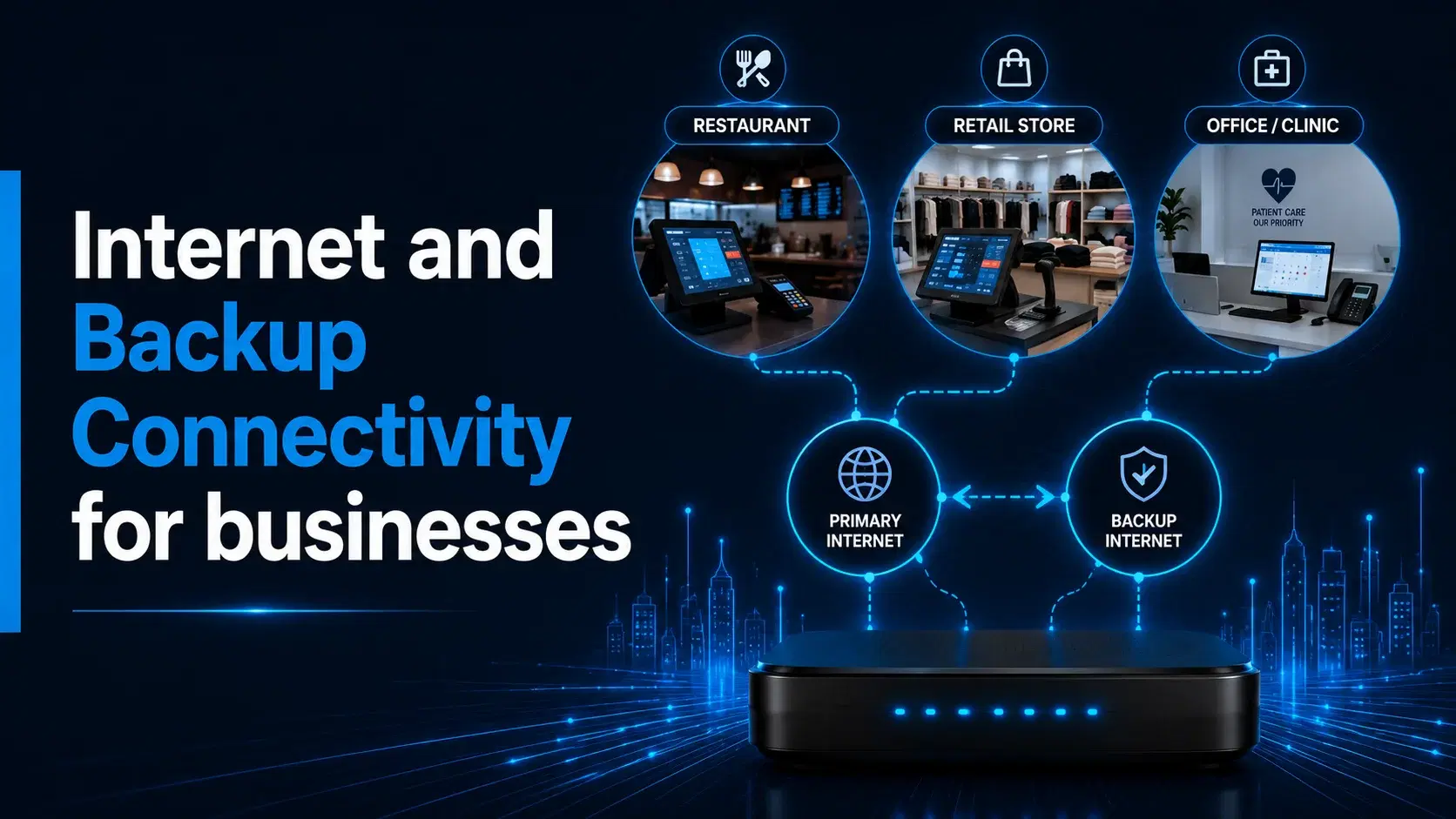
A restaurant during the dinner rush, a retail store processing weekend sales, and a professional office running cloud-based appointments all depend on internet connectivity. Yet these businesses do not use their connection in the same way. Their busiest hours, critical systems, customer expectations, and tolerance for downtime can be very different.
That is why internet planning should start with daily operations rather than a general list of technical specifications. The right setup depends on what must stay connected, how much disruption an outage could cause, whether staff work from one location or in the field, and what is available at the exact business address.
Local5GDeals helps Texas businesses review business internet, backup connectivity, and mobile-line needs around real business workflows. This guide compares the priorities of restaurants, retail stores, clinics, and professional offices so owners can prepare for a more useful address-level review.
Shared Connectivity Needs Across Small Businesses
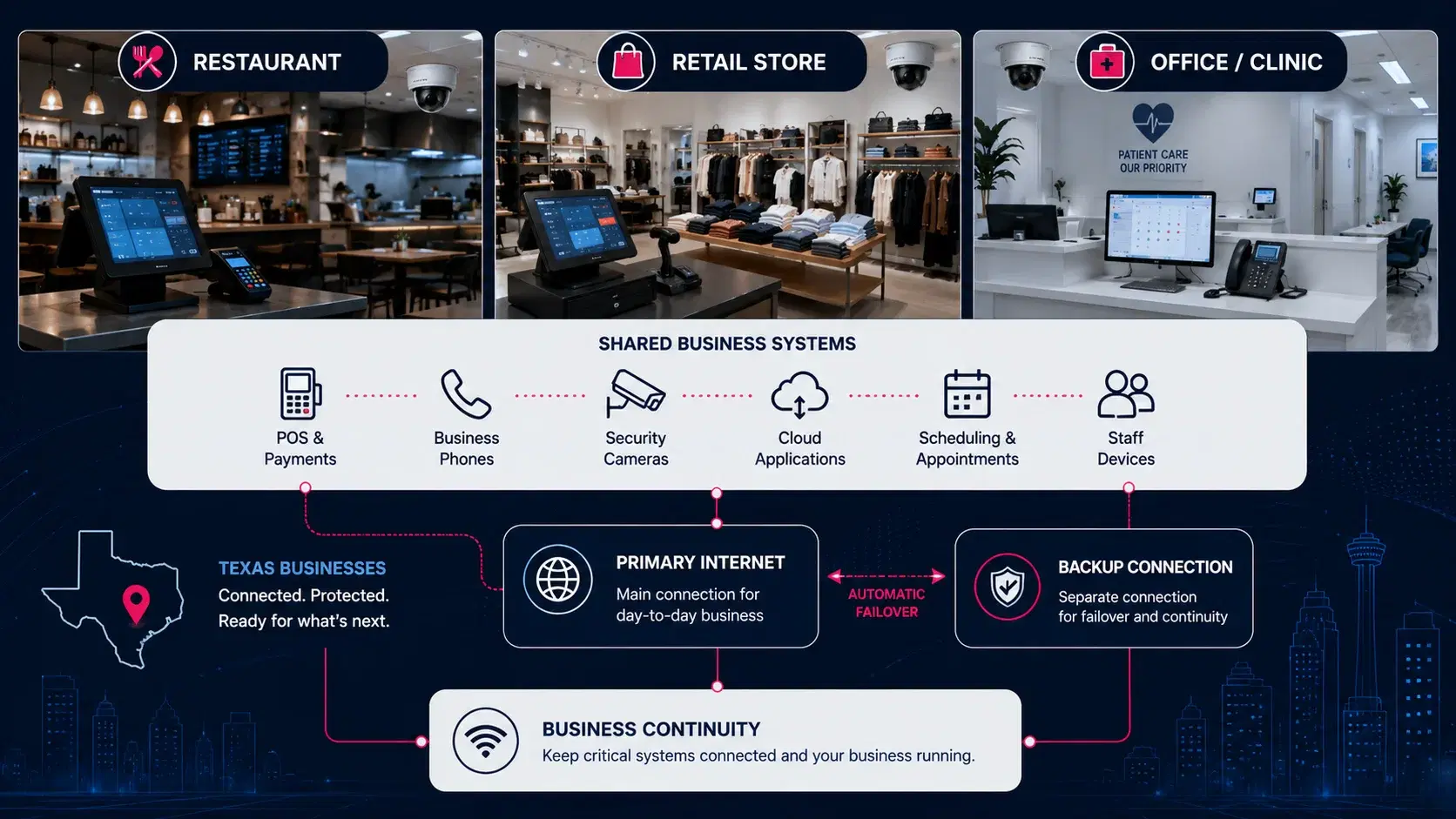
Most customer-facing businesses rely on a mix of payment systems, phones, cameras, cloud applications, scheduling tools, and staff devices. When the primary connection becomes unavailable, the effect is rarely limited to slow browsing. A disruption may stop card payments, interrupt online orders, prevent employees from accessing records, disconnect security monitoring, or make it harder for customers to reach the business.
The first planning step is to separate systems into three groups: essential systems that should stay online during an outage, useful systems that can temporarily operate with limited access, and nonessential systems that can wait. This creates a realistic foundation for deciding whether a business needs primary internet only, a separate backup connection, mobile hotspots, or a combination of services.
This classification prevents a backup plan from being overloaded with convenient but nonessential traffic. Music streaming, guest Wi-Fi, digital signage, software downloads, and general browsing may be useful during normal operations, but they may not deserve priority during an outage. Defining priorities in advance gives employees a clearer response plan.
Businesses should also review how systems depend on one another. A payment may require a router, cloud-based POS platform, printer, and employee tablet. Scheduling may depend on cloud access, phones, email, and customer notifications. Looking at the full workflow helps prevent one protected device from being blocked by another missing connection.
Internet Priorities for Restaurants
Restaurants often experience concentrated periods of activity. During lunch, dinner, or a weekend rush, even a short interruption can affect several systems at once. Point-of-sale terminals may lose connectivity, online orders may stop updating, kitchen display systems may fall behind, and delivery-platform tablets may become unreliable. Guest Wi-Fi can matter, but payment processing and order flow usually deserve higher priority.
A restaurant review should identify which terminals, card readers, online-order systems, phones, cameras, and back-office tools need continuous access. It should also consider where equipment is placed. Kitchens, storage areas, thick walls, metal surfaces, and multi-level layouts can influence how well a gateway or router serves the space. Placement should therefore be based on the actual building rather than a generic recommendation.
Backup connectivity may be especially useful for restaurants that depend heavily on electronic payments and online ordering. A properly planned backup internet connection can help preserve access to the most important systems when the primary connection fails. The final result depends on the exact address, equipment, network design, and applications being used, so the backup path should be tested before the business relies on it during a busy period.
Restaurants with several ordering channels should map each one separately. Counter orders, delivery platforms, reservations, kiosks, and catering requests may use different devices or applications. Owners should decide which channels must remain available and create a temporary process for confirming or pausing orders during an interruption.
Testing should reflect real operating conditions. A backup setup that works with one terminal early in the day may behave differently when payment devices, kitchen screens, tablets, phones, and cameras are active. Staff should know which devices are expected to stay online and whom to contact if a critical system does not reconnect.
Internet Priorities for Retail Stores
Retail stores also depend on payments, but their connectivity needs often extend further into inventory, pricing, customer engagement, and loss prevention. A store may use cloud-based inventory software, barcode scanners, digital displays, staff tablets, security cameras, loyalty tools, and communication systems alongside its point-of-sale platform.
For a single-location shop, the main concern may be keeping checkout and inventory access available. For a multi-location retailer, internet planning may also include shared dashboards, centralized stock management, remote camera access, and consistent communication between locations. Each address should still be reviewed separately because service availability and building conditions can differ from one storefront to another.
Retail owners should decide whether guest Wi-Fi and digital displays should use the same network resources as payment and operational systems. Separating critical business traffic from lower-priority customer traffic can make the setup easier to manage. During a primary outage, the backup connection can then be reserved for checkout, inventory lookups, essential communication, and selected security functions instead of trying to support every connected device.
Retail demand can change during holidays, promotions, and major sales events. Temporary checkout stations, scanners, tablets, and staff devices may increase network use. Retailers should review these added devices before busy periods and limit lower-priority traffic when necessary.
Multi-location retailers can use one operational checklist, but each address still needs an individual review. Building layout, wall materials, stockrooms, equipment location, and available services may differ, so placement and backup priorities should be adjusted for each store.
Internet Priorities for Clinics and Professional Offices
Clinics and professional offices usually have a different traffic pattern. They may not process a constant stream of retail transactions, but they depend on reliable access to scheduling, records, billing platforms, cloud documents, video meetings, business phones, and secure communication. A connection problem can delay appointments, interrupt front-desk work, and prevent staff from accessing the information needed to serve customers or patients.
A clinic should identify which systems are essential for check-in, scheduling, billing, phones, and records access. Professional offices may prioritize cloud applications, file sharing, customer portals, video calls, and remote collaboration. Security and privacy requirements should be reviewed with the relevant technology or compliance provider because an internet connection alone does not determine whether a workflow meets industry obligations.
For these environments, backup planning often focuses on preserving core access rather than supporting every workstation at full capacity. The business may choose to keep front-desk systems, phones, a limited number of staff devices, and essential cloud tools connected while pausing large downloads, software updates, or noncritical guest access until the primary service returns.
Offices should distinguish between local and cloud-based resources. Some employees may continue with locally stored files, while others may lose access to customer records, shared documents, hosted phones, or online portals. This helps determine which teams and workstations need priority access.
Clinics and regulated practices should involve their IT and compliance advisers. Backup connectivity provides another path to the internet, but it does not replace access controls, secure device configuration, data-protection policies, or application-specific requirements.
Primary Internet and Backup Internet Serve Different Roles
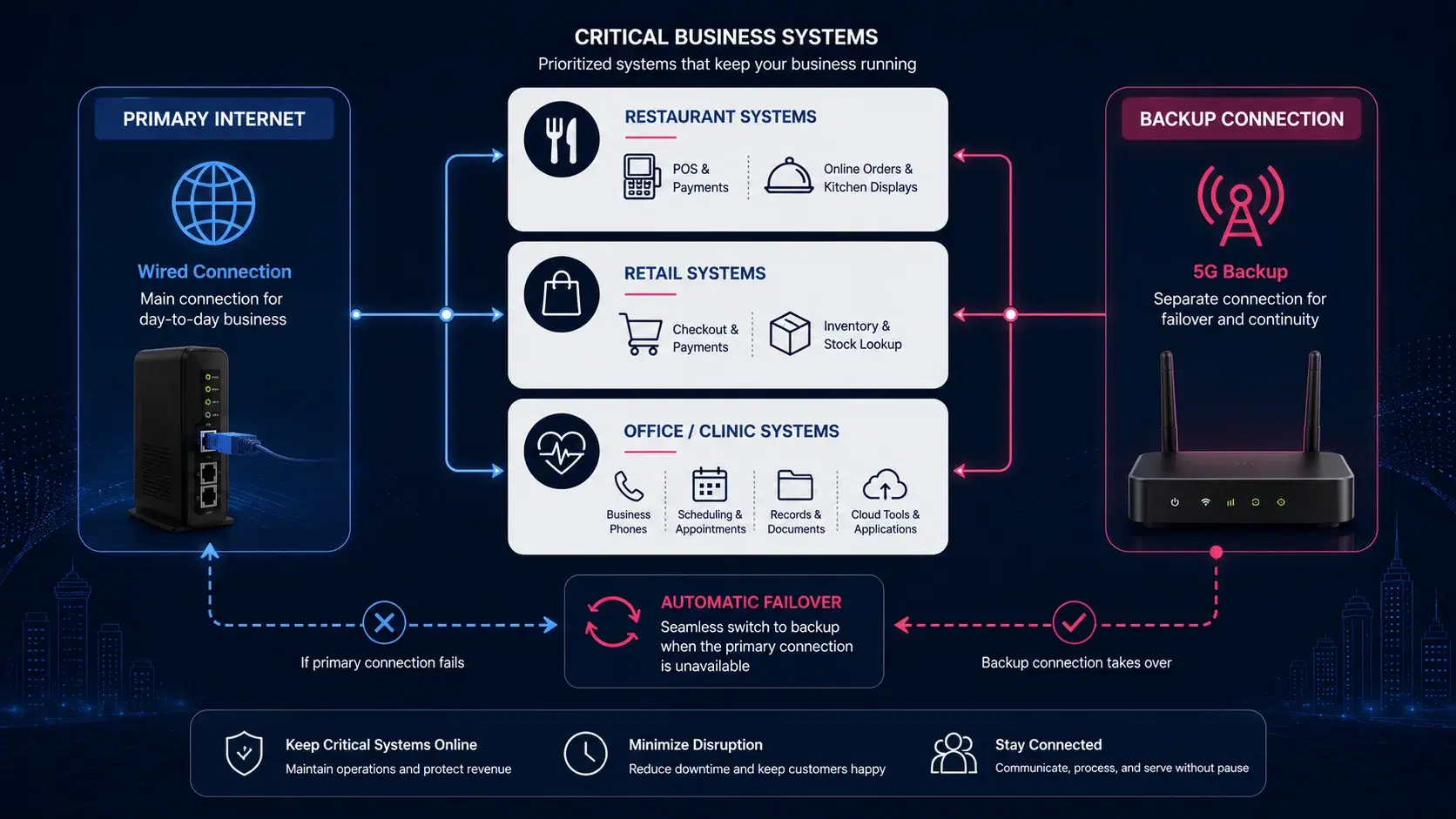
Primary internet is the connection a business expects to use during normal operations. Backup internet is a separate path intended to reduce disruption when the primary connection is unavailable. The two services should not be treated as interchangeable without reviewing the address, coverage conditions, equipment, and normal business workload.
For outage-sensitive businesses, 5G backup internet may be considered behind an existing wired connection. Restaurants may prioritize card readers and online orders. Retailers may prioritize checkout and inventory. Clinics and offices may prioritize phones, scheduling, records, and cloud access. The backup plan becomes more practical when it is designed around these specific systems.
Businesses should also decide how traffic will move to the backup connection. Some setups require a person to switch connections, while others may use failover-ready networking equipment. The router, gateway, cabling, device configuration, and testing process all matter. A backup service that has never been tested may not perform as expected when the primary line fails.
A continuity plan should explain what happens before, during, and after failover. Equipment and essential applications should be tested in advance. During an outage, staff should know which systems remain available and which tasks should pause. After service returns, the business should confirm that devices and important transactions are operating normally.
Two connections do not automatically create resilience if both rely on the same power source, router, cabling path, or poorly positioned equipment. The full setup should be reviewed with relevant IT, POS, phone, or technology providers so the business understands how it behaves when a component fails.
Mobile Lines and Hotspots for Staff Continuity
Mobile connectivity can support operations that extend beyond the fixed business location. Restaurant managers may need to coordinate deliveries or vendors. Retail teams may use mobile devices for stock checks or curbside pickup. Clinics and offices may have employees who travel, work remotely, or need a secondary way to communicate during a local outage.
A combined review of business mobile lines and connected-device needs can help owners avoid making separate decisions for every phone, tablet, and hotspot. A hotspot can be useful for a small number of devices or temporary work, but it should not automatically be treated as a complete replacement for a planned business backup connection.
Mobile lines can support communication when the main phone system is unavailable, but roles should be defined. Businesses should decide who needs mobile access, which applications are approved, how devices are managed, and whether employees need connectivity only on-site or while traveling.
Address Review Checklist
Before choosing a primary or backup setup, prepare the following information:
- Exact street address, city, and ZIP code for every business location.
- Type of business and the busiest operating periods.
- List of systems that depend on internet access, including POS, phones, cameras, scheduling, cloud tools, records, and inventory.
- Current primary internet type and any common outage concerns.
- Number of employees, workstations, payment terminals, tablets, and connected devices.
- Building details that may affect equipment placement, such as multiple floors, thick walls, kitchens, storage rooms, or large customer areas.
- Systems that must remain available during an outage and systems that can wait.
- Need for mobile lines, field devices, tablets, or temporary hotspot access.
- Whether the business has one location or several addresses.
Because availability can vary by exact location, the next step is to check business availability rather than relying on a general city-level assumption. Texas businesses in the Houston area can also review the Houston business internet service page for local examples and address-first guidance.
Document current problems with specific details. Note when interruptions occur, which devices are affected, whether the issue is limited to one part of the building, and how employees respond. This can help distinguish service availability from equipment, placement, local-network, or application issues.
Choose Connectivity Around the Way Your Business Operates
Restaurants, retail stores, clinics, and professional offices may use many of the same connected tools, but they do not face the same operational risks. A restaurant may focus on payments and order flow. A retailer may need checkout, inventory, and camera access. A clinic or office may prioritize phones, scheduling, records, and cloud applications.
The most useful plan is the one that reflects the exact address, the building, the critical systems, and the cost of downtime for that specific business. Start by documenting what must stay online, then review primary internet, backup connectivity, mobile devices, equipment placement, and failover needs together.
The final comparison should consider more than monthly price. Review the operational value of keeping essential systems available, required equipment, failover effort, support, and the impact of downtime during peak hours. A cheaper option may leave critical workflows unplanned, while a complex setup may be unnecessary for a business with a simple temporary process.
The strongest decision combines an exact-address availability check with a clear list of critical systems and realistic outage procedures. This helps Texas business owners compare options based on real operations instead of general assumptions about a city, industry, or advertised service category.
Frequently Asked Questions
Do restaurants and retail stores need backup internet?
Not every business needs the same setup, but restaurants and retailers that depend on card payments, online orders, inventory, or cloud-based checkout tools may benefit from reviewing a separate backup connection. The decision should be based on the exact address, outage risk, equipment, and critical systems.
What business systems should receive priority during an outage?
Priority usually goes to systems directly connected to sales, customer service, communication, safety, or essential records. Depending on the business, this may include POS terminals, card readers, phones, scheduling, inventory, security cameras, and selected cloud applications.
Can one backup connection support every device in the business?
That depends on the connection, equipment, device count, applications, and local conditions. Many businesses plan backup service for a smaller group of essential systems rather than every workstation, guest device, display, and noncritical application.
Is a mobile hotspot the same as business backup internet?
No. A hotspot may provide temporary connectivity for a limited number of devices, while a business backup setup is usually planned around critical systems, router compatibility, equipment placement, and a defined failover process.
Why does equipment placement matter?
Walls, building materials, floor plans, kitchens, storage areas, and other physical conditions can affect wireless equipment. Placement should be reviewed at the actual location and tested around the systems the business needs to keep connected.
How can a Texas business begin an address review?
Provide the exact street address, city, ZIP code, service type, and a short description of the systems your business uses. Local5GDeals can then help review realistic business internet, backup connectivity, and mobile-line options for that location.